ATLAS Control - Stream Deck plugin
Drives Motion Applied ATLAS's own keyboard shortcuts from an Elgato Stream Deck, so a driver or engineer can zoom a waveform or swap a compare set without taking a hand off the wheel setup to hunt for a keyboard chord.
The problem it solves
ATLAS documents a large keyboard shortcut surface, but a keyboard isn't always within reach at the rig, and remembering 150+ chords isn't realistic mid-session anyway. This plugin adds one Stream Deck action, ATLAS Command, that covers the whole shortcut reference - drop it on a key, pick a command from a searchable list in the property inspector, and pressing the key sends the exact chord ATLAS expects.
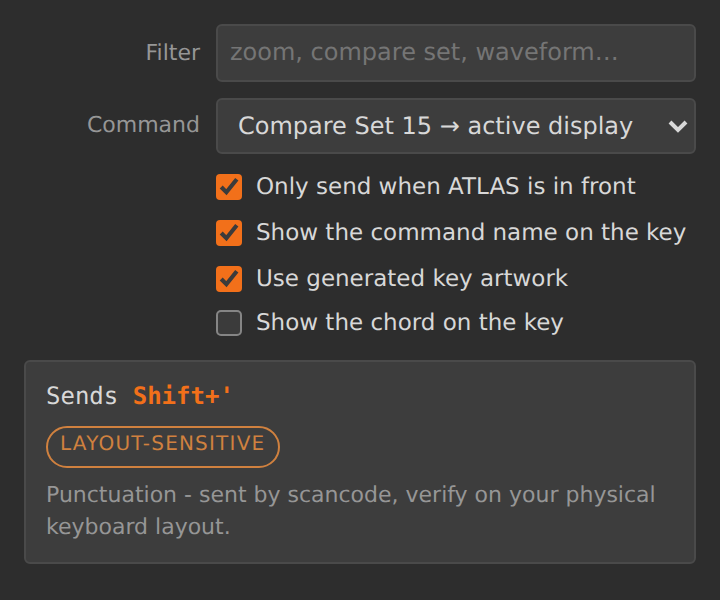
The key's own configuration panel inside the Stream Deck app - the chord, its safety tier, and a note when one applies, all read from the real 158-command catalogue.
What's involved
Every section of ATLAS's shortcut reference - Main Window, Compare Sets, Timeline,
Displays, Waveform and more. Each command is tiered safe / focus
/ layout / hostile by how reliably it can actually be delivered,
and the property inspector surfaces that tier so a driver isn't surprised by a chord that
only works under specific conditions.
Every send is preceded by a foreground-window check. A keystroke that misses ATLAS lands
wherever else is focused - for a chord like Ctrl+S or Delete
that's the difference between a no-op and doing damage somewhere else entirely.
A Stream Deck press is a single discrete event; the keyboard gives a smooth ramp on a held zoom key. Commands the catalogue marks repeatable ramp while held, at roughly Windows' own key-repeat rate - destructive commands are never allowed to repeat.
Keys are sent by physical scancode, not by character, because several ATLAS shortcuts
land on punctuation that moves between keyboard layouts - Shift+' selects
compare set 15 on a US board and something else entirely on a UK ISO one.
Why it's worth trusting - and what still isn't
This one is refreshingly upfront about its own status. On a real Windows machine, the
keystroke-injection layer is confirmed working end to end: the PowerShell helper spawns, its
embedded C# compiles, GetForegroundWindow resolves a real process name, and
SendInput genuinely types into the focused window - which also proved out the
trickiest low-level detail, the Windows INPUT struct's exact byte layout. What
is not yet verified is ATLAS's own reaction to that input - whether each shortcut
actually fires, and whether the plugin's focus-gate process names match a real ATLAS install
- because that needs an actual Stream Deck sat next to a running copy of ATLAS. 90 tests cover
everything that can be checked without that hardware: catalogue integrity, chord parsing,
scancode mapping, focus gating and repeat timing.